UTTARAKHAND LAND RECORDS PORTAL

Bhulekh UK: Complete Guide to Uttarakhand Land Records Online

If you own land in Uttarakhand, or you're planning to buy property there, you've probably come across the term Bhulekh UK.

It's the official online system that lets users check:

πŸ“„ Khasra
🧾 Khatauni
🏑 Jamabandi
πŸ—ΊοΈ Land Maps

without visiting a government office. This guide explains what Bhulekh UK is, how the portal works, and how to use it step by step.
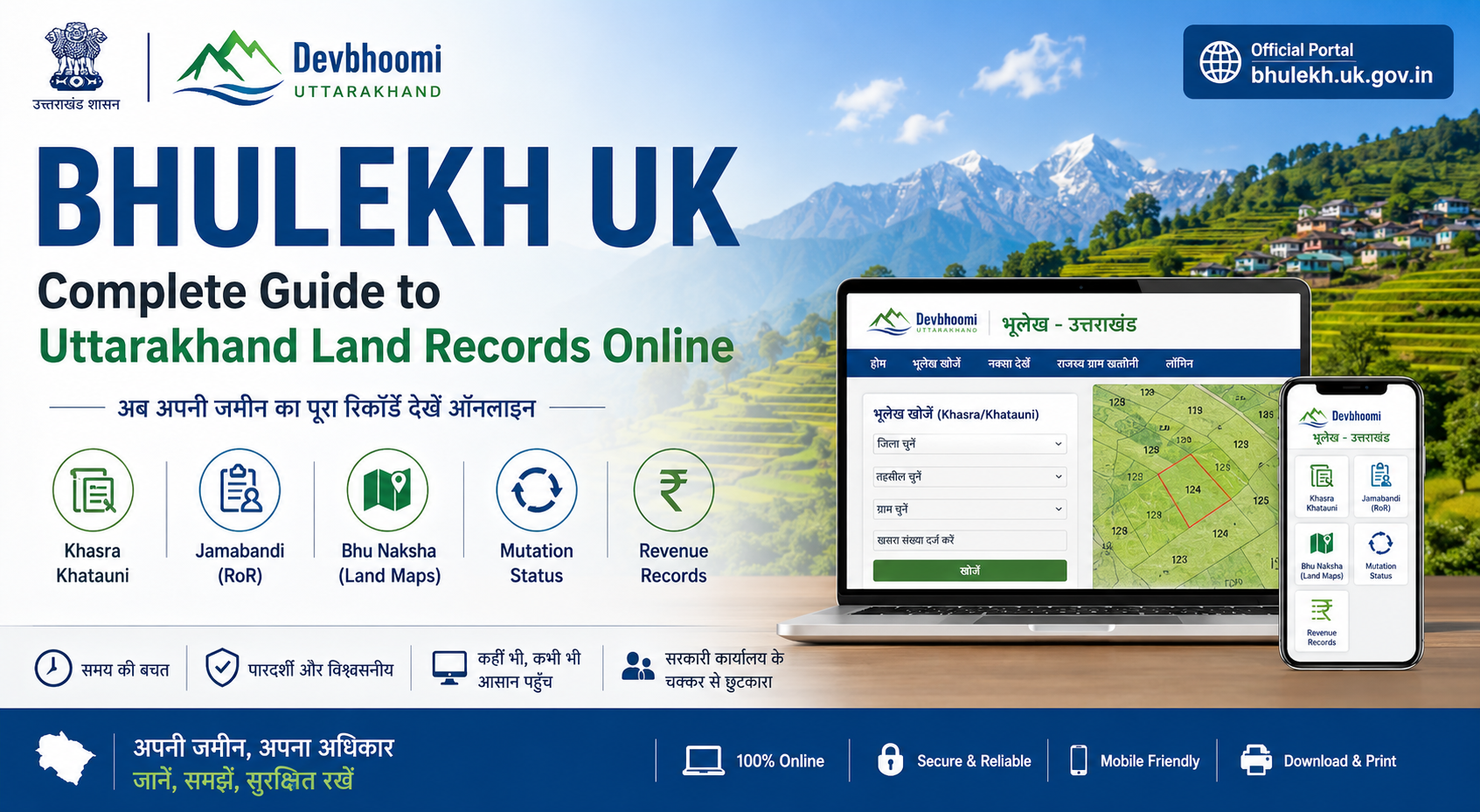
Bhulekh UK Uttarakhand Land Records
🌐

What Is Bhulekh UK?

Bhulekh UK is Uttarakhand's official digital land-records platform maintained by the Revenue Department.

πŸ”Ž

What You Can Check

Users can search ownership details, khasra numbers, khatauni records, jamabandi copies, and land map information online.

⚑

Why It Matters

The portal reduces paperwork, saves time, improves transparency, and helps buyers verify land ownership before purchase.

ℹ️

Important Note

Online records are useful for reference and verification, but certified copies and legal boundary disputes may still require verification through the local revenue office.

HISTORY & MEANING

What Does "Bhulekh" Mean?

The word Bhulekh comes from two Hindi words:

🌍

Bhu

Means Land

πŸ“œ

Alekh

Means Record

🧾

Combined Meaning

Put together, Bhulekh simply means:

"Land Record"
🌐
Official Uttarakhand Portal

bhulekh.uk.gov.in

Also commonly called: Devbhoomi Portal
LAND RECORD HISTORY

How Land Records Evolved in India

Land record-keeping in India is not new. The system dates back centuries and was originally maintained for taxation and revenue collection.

Mughal Era

Early Revenue Records

Land ownership and cultivation details were recorded mainly for tax collection purposes.

British Rule

Structured Survey System

The British expanded and standardized cadastral surveys, jamabandi records, and land taxation systems.

Post Independence

State Government Control

After 1947, individual state governments became responsible for maintaining and updating land records.

1988–89

CLR Initiative

India launched the Computerisation of Land Records (CLR) programme to begin digitizing manual records.

2008

NLRMP Programme

The National Land Records Modernization Programme (NLRMP) accelerated digitization of Records of Rights (RoR), maps, and ownership data across states.

ℹ️

Why Digitization Matters

Modern online land-record systems like Bhulekh UK improve transparency, reduce manual paperwork, speed up property verification, and help reduce land-related fraud and disputes.

UTTARAKHAND DIGITAL LAND RECORDS

What Is the UK Bhulekh / Devbhoomi Portal?

The Bhulekh UK / Devbhoomi Portal was developed by the Uttarakhand Department of Revenue and the Board of Revenue, in partnership with the National Informatics Centre (NIC).

It covers all 13 districts of Uttarakhand and provides online access to important land records, ownership details, maps, and mutation information.

πŸ“„

Khasra-Khatauni Details

Check ownership records, land area, khasra numbers, and land classification details online.

🧾

Jamabandi (Record of Rights)

View the legal ownership document containing owner names, land share, and revenue details.

πŸ—ΊοΈ

Bhu Naksha (Land Maps)

Access plot-wise boundary maps and village land layouts digitally.

πŸ”„

Mutation Status

Track ownership-transfer applications after property sale, inheritance, or partition.

πŸ’°

Revenue Records

View land revenue dues, payment history, and related entries online.

⚑

Why the Portal Matters

Earlier, citizens usually had to visit a Tehsil office physically for even basic land-record work.

Today, the e Bhulekh UK portal allows users to access land records, maps, and ownership information directly from a phone or laptop.

IMPORTANT LAND TERMS

Key Terms You'll Come Across

🌾

Khasra

A unique identification number assigned to a specific agricultural plot, including crop and land-use details.

πŸ“š

Khatauni

A combined record listing all khasras (land holdings) belonging to a person or family within a village.

🧾

Jamabandi

Also called fard or parcha, this is the official Record of Rights document showing ownership and taxes.

ONLINE LAND RECORD SEARCH

How to Check Bhulekh UK Gov In Land Records Online

Here's how to search your Uttarakhand land record online using the official Bhulekh UK / Devbhoomi portal.
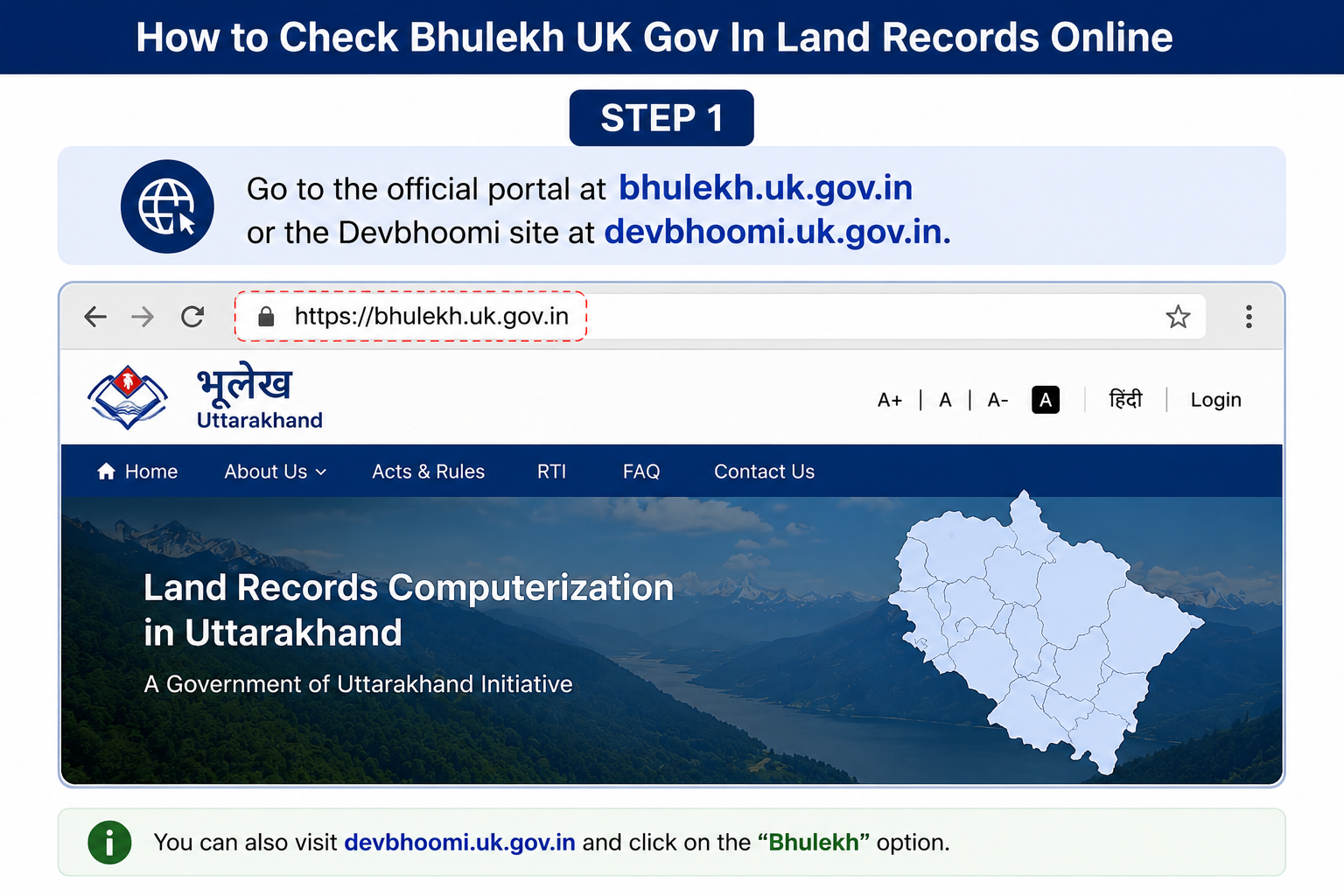
STEP 1
Bhulekh UK Portal Step 1

Open the Official Portal

Visit: bhulekh.uk.gov.in or devbhoomi.uk.gov.in using your mobile or desktop browser.
STEP 2
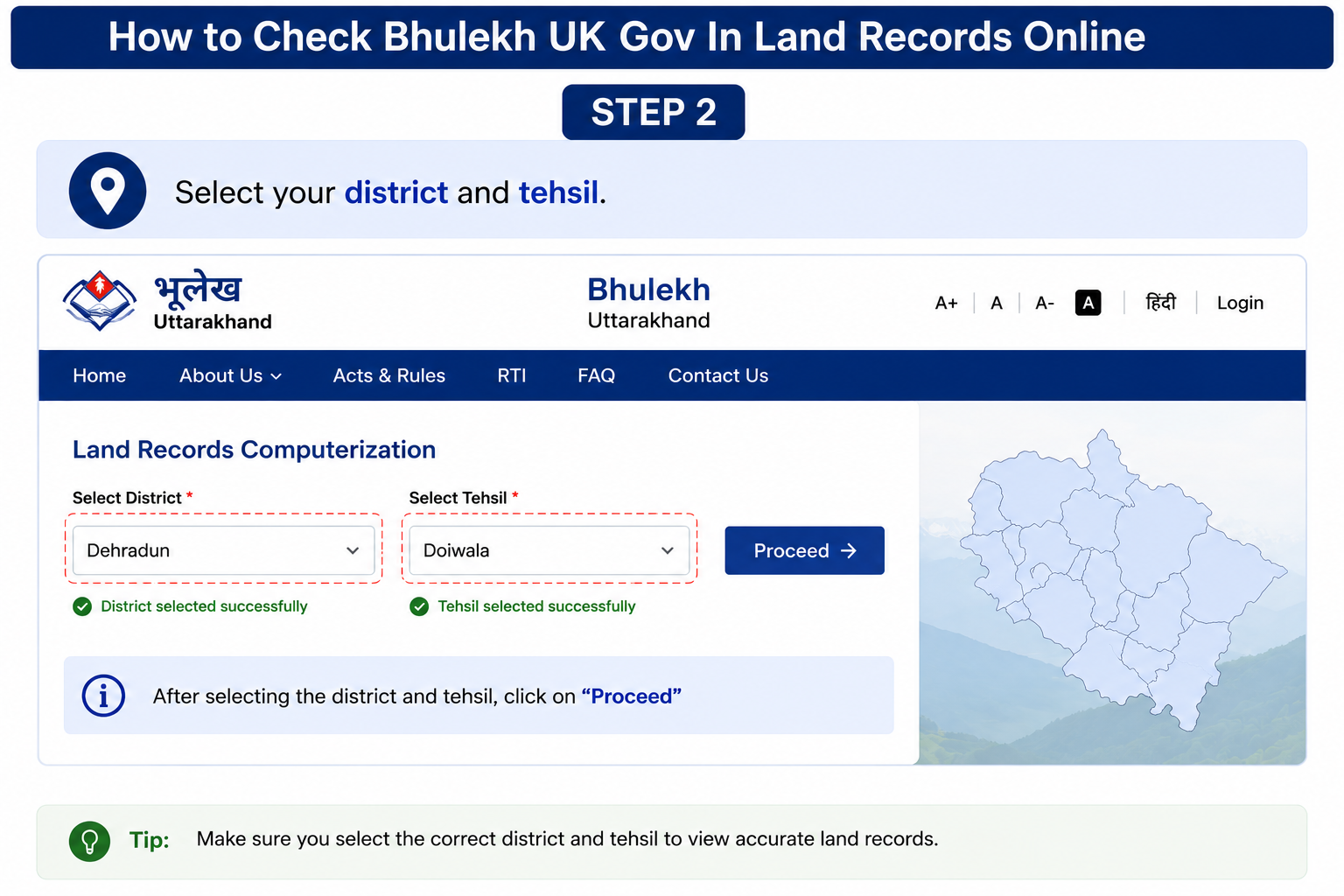
Bhulekh UK Portal Step 2

Select District & Tehsil

Choose your district and tehsil from the dropdown list provided on the portal.
STEP 3
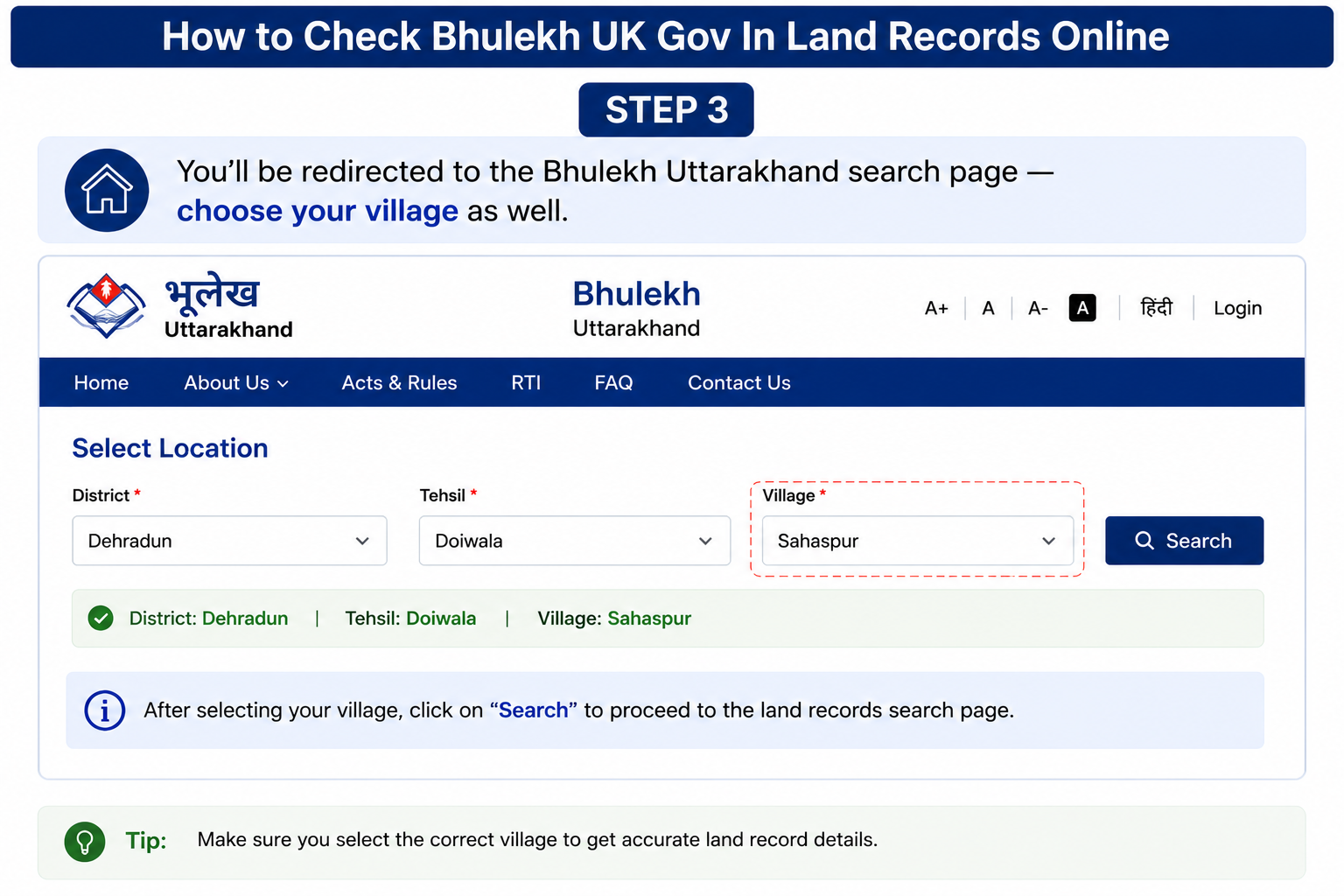
Bhulekh UK Portal Step 3

Choose Your Village

After redirection to the Bhulekh Uttarakhand search page, select your village details.
STEP 4
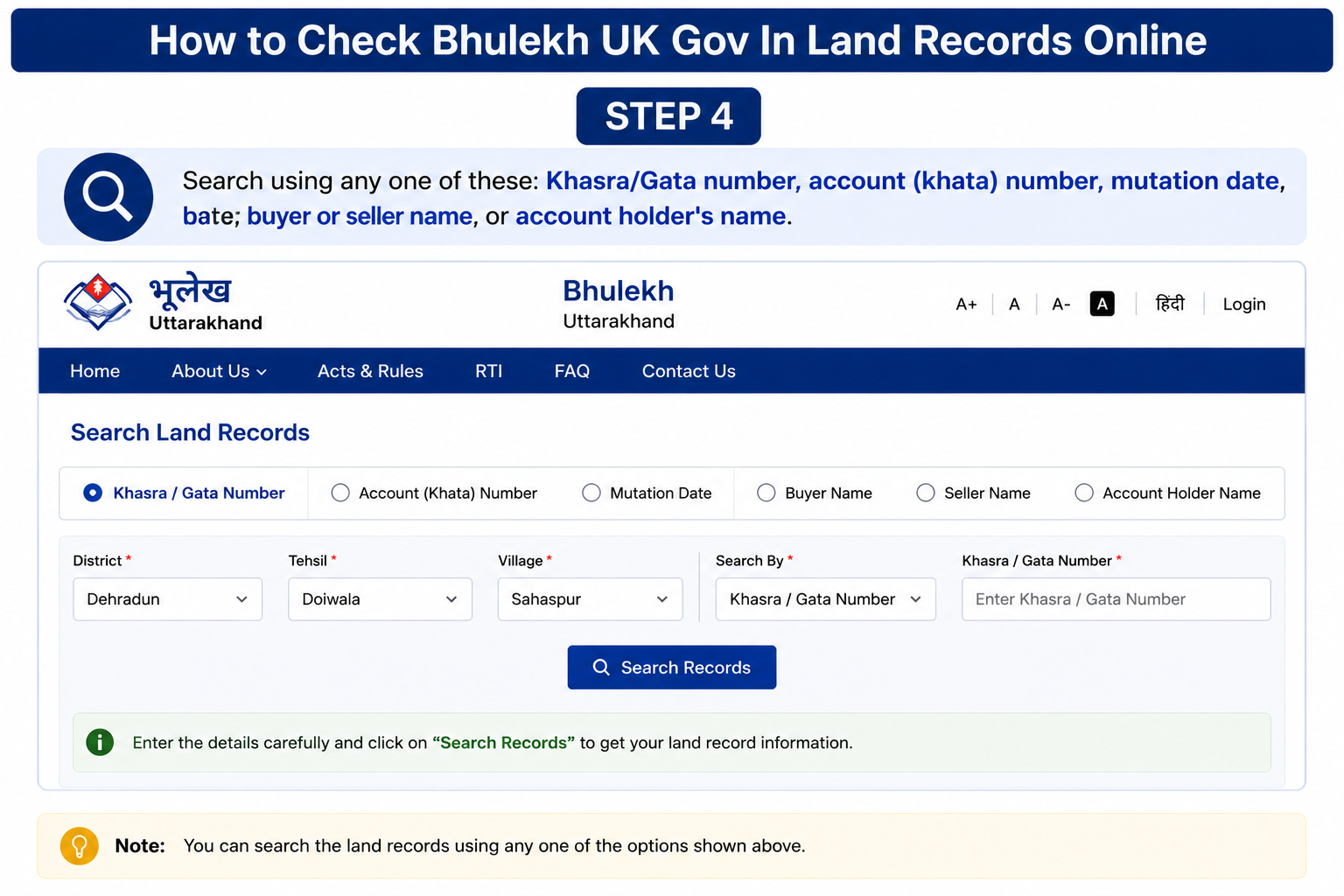
Bhulekh UK Portal Step 4

Search the Land Record

Search using any one of these:

  • Khasra / Gata number
  • Khata number
  • Mutation date
  • Buyer or seller name
  • Account holder's name
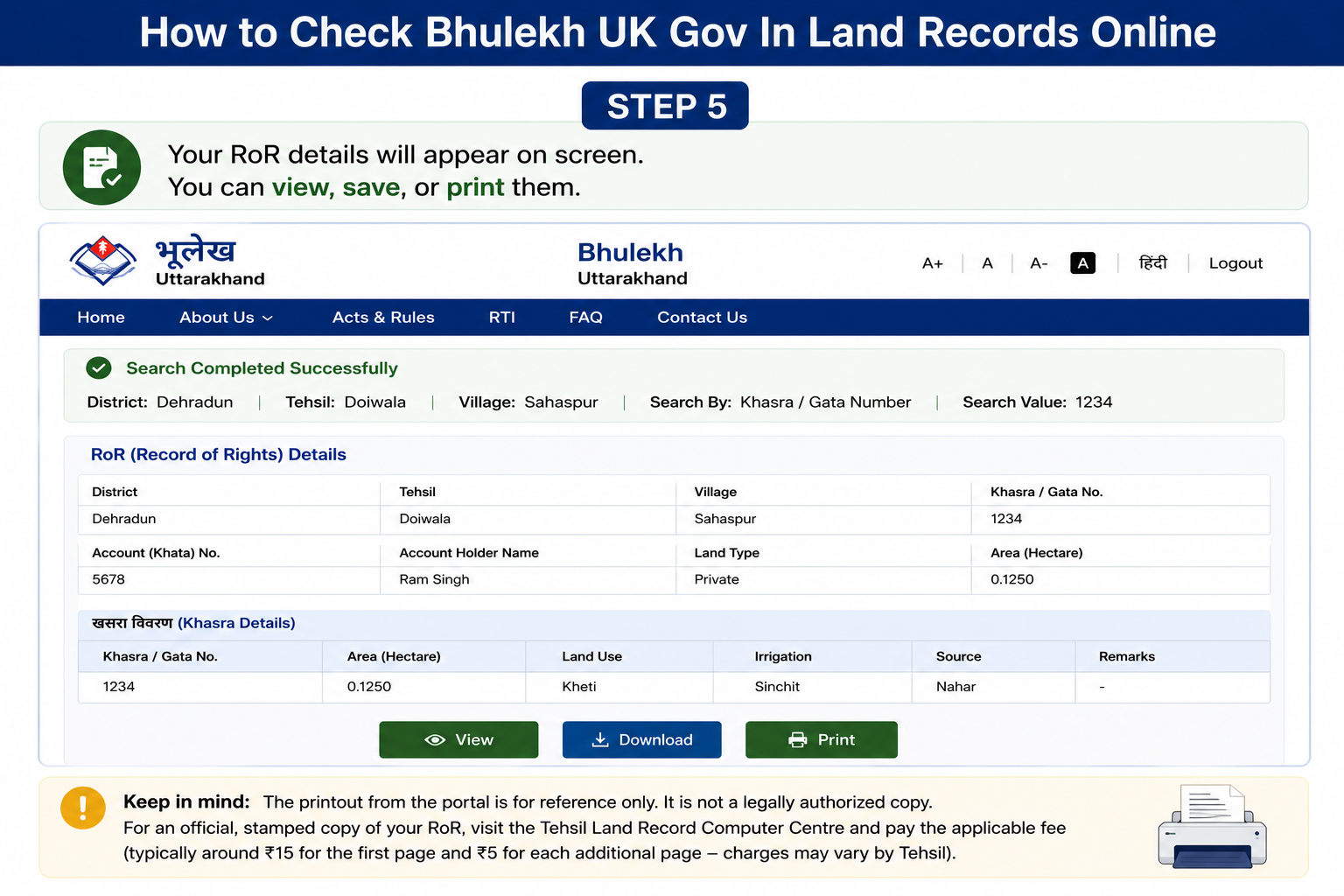
STEP 5
Bhulekh UK Portal Step 5

View or Print RoR Details

Your Record of Rights (RoR) details will appear on screen. You can:

  • View the record
  • Save the details
  • Print a copy
ℹ️

Important Legal Note

The online printout available on the portal is meant for reference purposes only. It is not considered a legally certified copy.

For official use in:

  • Bank loans
  • Court matters
  • Property registration
  • Legal verification

you'll need to visit the Tehsil Land Record Computer Centre and request a stamped certified copy.

πŸ’°

Certified Copy Charges

Typical charges are:

β‚Ή15 First page
β‚Ή5 Each additional page

Charges are fixed by the Tehsil office and may change over time.

ONLINE LAND RECORD SEARCH

How to Check Bhulekh UK Gov In Land Records Online

Here's how to search your Uttarakhand land record online using the official Bhulekh UK / Devbhoomi portal.

STEP 1
Bhulekh UK Portal Step 1

Open the Official Portal

Visit: bhulekh.uk.gov.in or devbhoomi.uk.gov.in using your mobile or desktop browser.

STEP 2
Bhulekh UK Portal Step 2

Select District & Tehsil

Choose your district and tehsil from the dropdown list provided on the portal.

STEP 3
Bhulekh UK Portal Step 3

Choose Your Village

After redirection to the Bhulekh Uttarakhand search page, select your village details.

STEP 4
Bhulekh UK Portal Step 4

Search the Land Record

Search using any one of these:

  • Khasra / Gata number
  • Khata number
  • Mutation date
  • Buyer or seller name
  • Account holder's name
STEP 5
Bhulekh UK Portal Step 5

View or Print RoR Details

Your Record of Rights (RoR) details will appear on screen. You can:

  • View the record
  • Save the details
  • Print a copy
ℹ️

Important Legal Note

The online printout available on the portal is meant for reference purposes only. It is not considered a legally certified copy.

For official use in:

  • Bank loans
  • Court matters
  • Property registration
  • Legal verification

you'll need to visit the Tehsil Land Record Computer Centre and request a stamped certified copy.

πŸ’°

Certified Copy Charges

Typical charges are:

β‚Ή15 First page
β‚Ή5 Each additional page

Charges are fixed by the Tehsil office and may change over time.

LOGIN & REGISTRATION

e Bhulekh UK Gov In Registration and Login

Most public land-record searches on the Bhulekh UK portal are available without creating an account.

However, some advanced services β€” especially application tracking and administrative functions β€” require registration or official login access.

🌐

Public Access

Citizens can search:

  • Khasra-Khatauni
  • Jamabandi / RoR
  • Land ownership details
  • Basic revenue records
No login required for public RoR search.
πŸ“

New User Registration

Registration for certain services is available through the:

landuse.uk.gov.in

Users may need registration for application-related services and tracking facilities.

πŸ”Ž

Application Status Tracking

Citizens can track applications using the application status page available on the same domain.

This is commonly used for:

  • Mutation tracking
  • Revenue applications
  • Land-use related requests
πŸ›οΈ

Administrative Login

Separate administrative access exists for:

  • Board of Revenue officials
  • District-level officers
  • Tehsil officials

These logins provide access to internal administrative functions and record-management tools.

ℹ️

Important for Citizens

If your goal is simply to:

  • Check land ownership
  • Search khasra-khatauni
  • View jamabandi records
  • Verify plot details

then you usually do not need to register or log in. The public search system remains openly accessible.

⚑ In short: Public land-record searches are open to everyone, while registration/login is mainly needed for tracking applications and official administrative work.
DAKHIL-KHARIJ / OWNERSHIP TRANSFER

Mutation (Dakhil-Kharij) in Uttarakhand

Mutation, also known as Dakhil-Kharij, is the process of updating government land records after ownership changes due to:

🏑 Property Sale
πŸ‘¨β€πŸ‘©β€πŸ‘§ Inheritance
πŸ“œ Will Transfer
βš–οΈ Partition

It officially updates the new owner's name in revenue records, which affects future property transactions, taxes, and ownership verification.

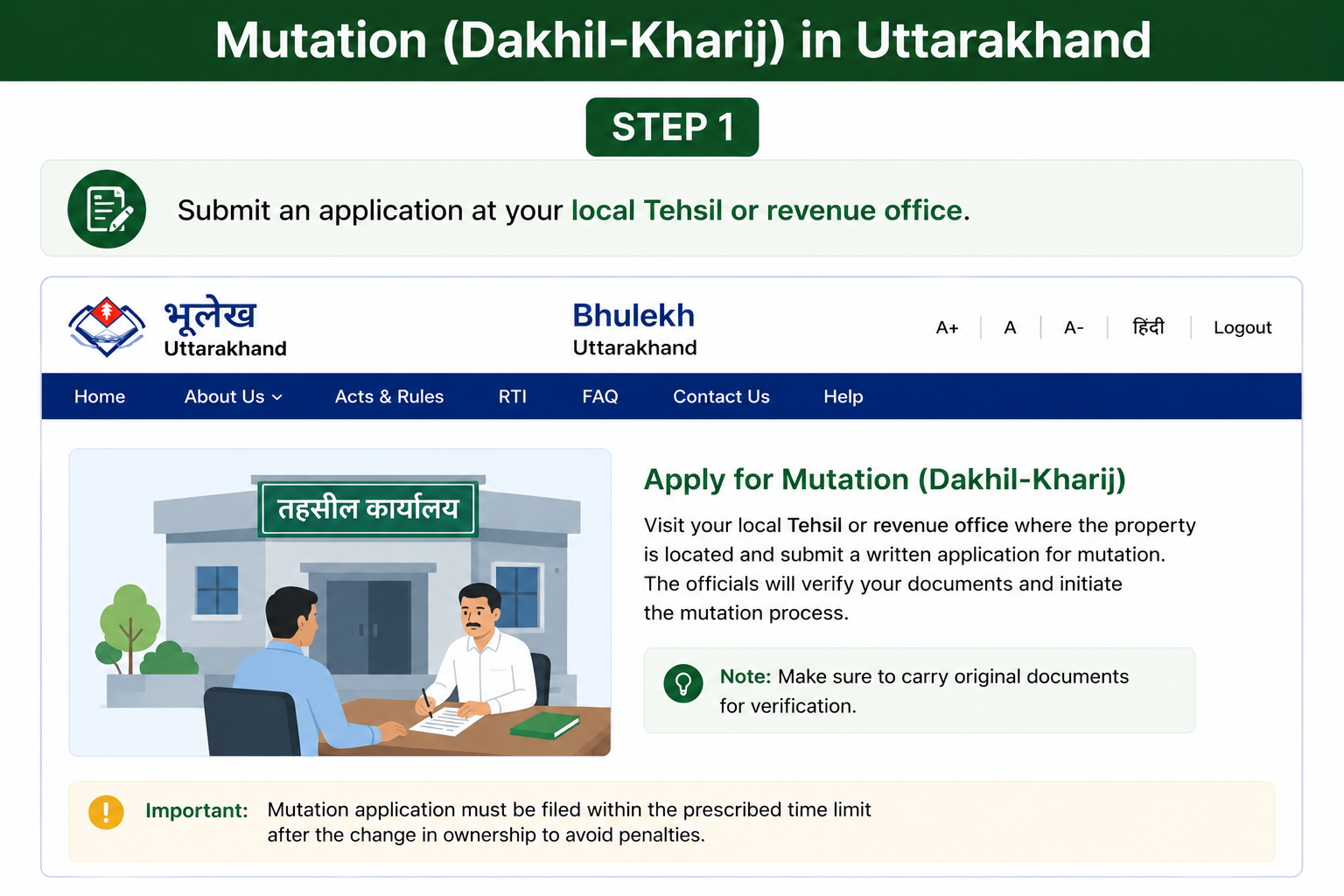
STEP 1

Submit Application at Tehsil Office

Mutation Uttarakhand Step 1

Visit your local Tehsil office or revenue office and submit the mutation application form. This starts the official ownership-update process.

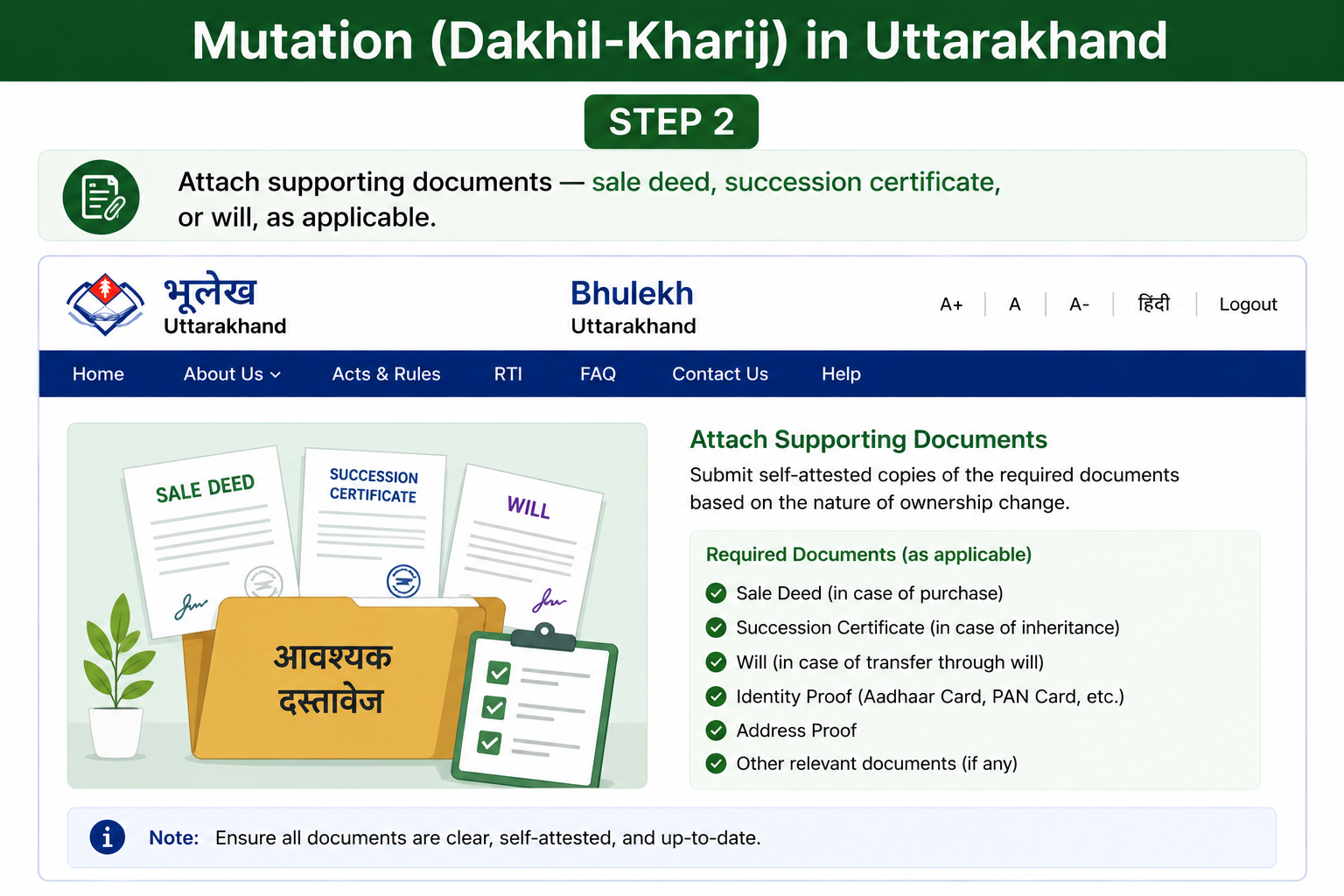
STEP 2

Attach Supporting Documents

Mutation Uttarakhand Step 2

Submit all required ownership documents, depending on the case type.

  • Sale deed
  • Succession certificate
  • Registered will
  • Previous land records
  • Other supporting documents
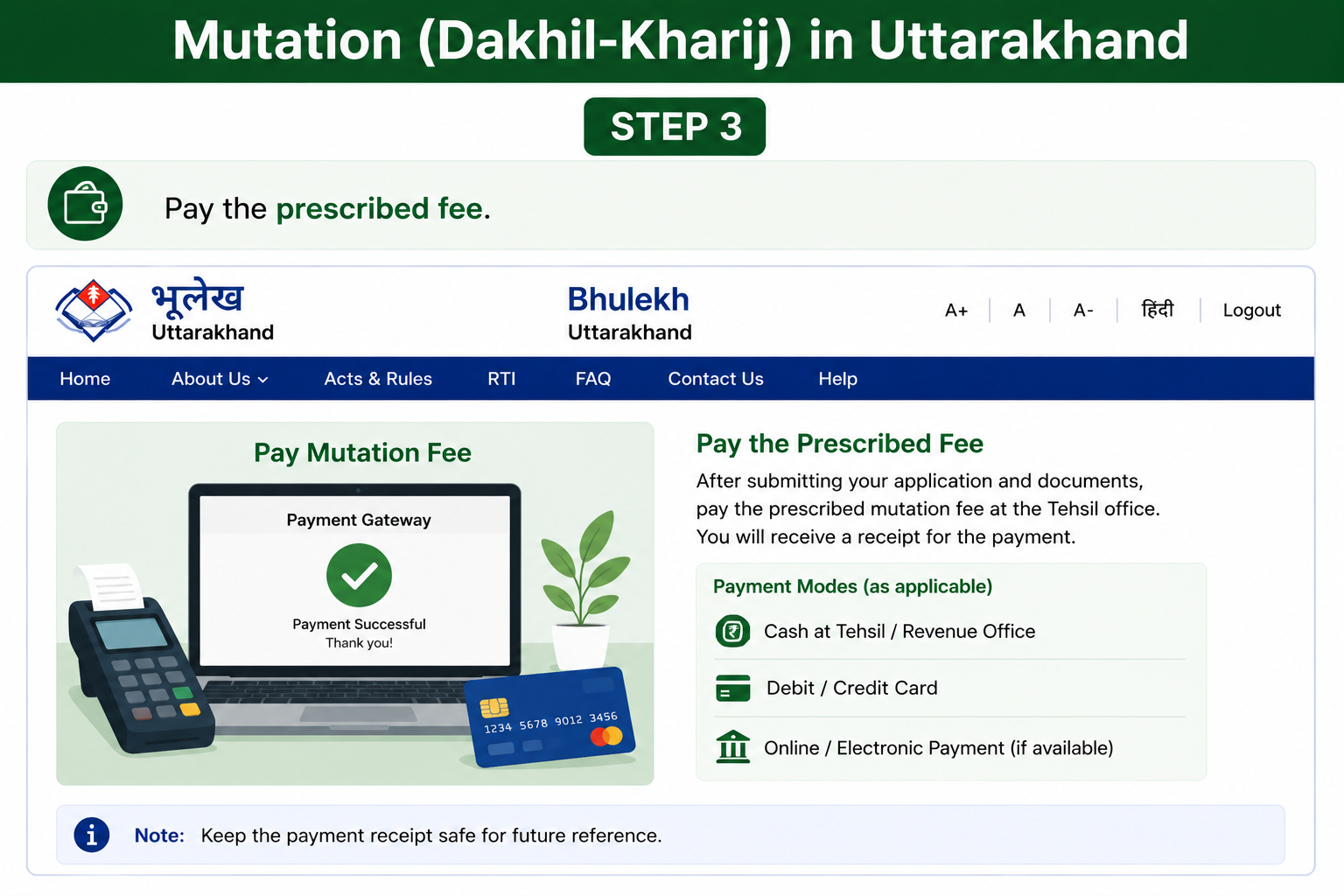
STEP 3

Pay the Mutation Fee

Mutation Uttarakhand Step 3

Pay the prescribed mutation fee as instructed by the Tehsil office. Charges may vary depending on the case and local revenue rules.

STEP 4

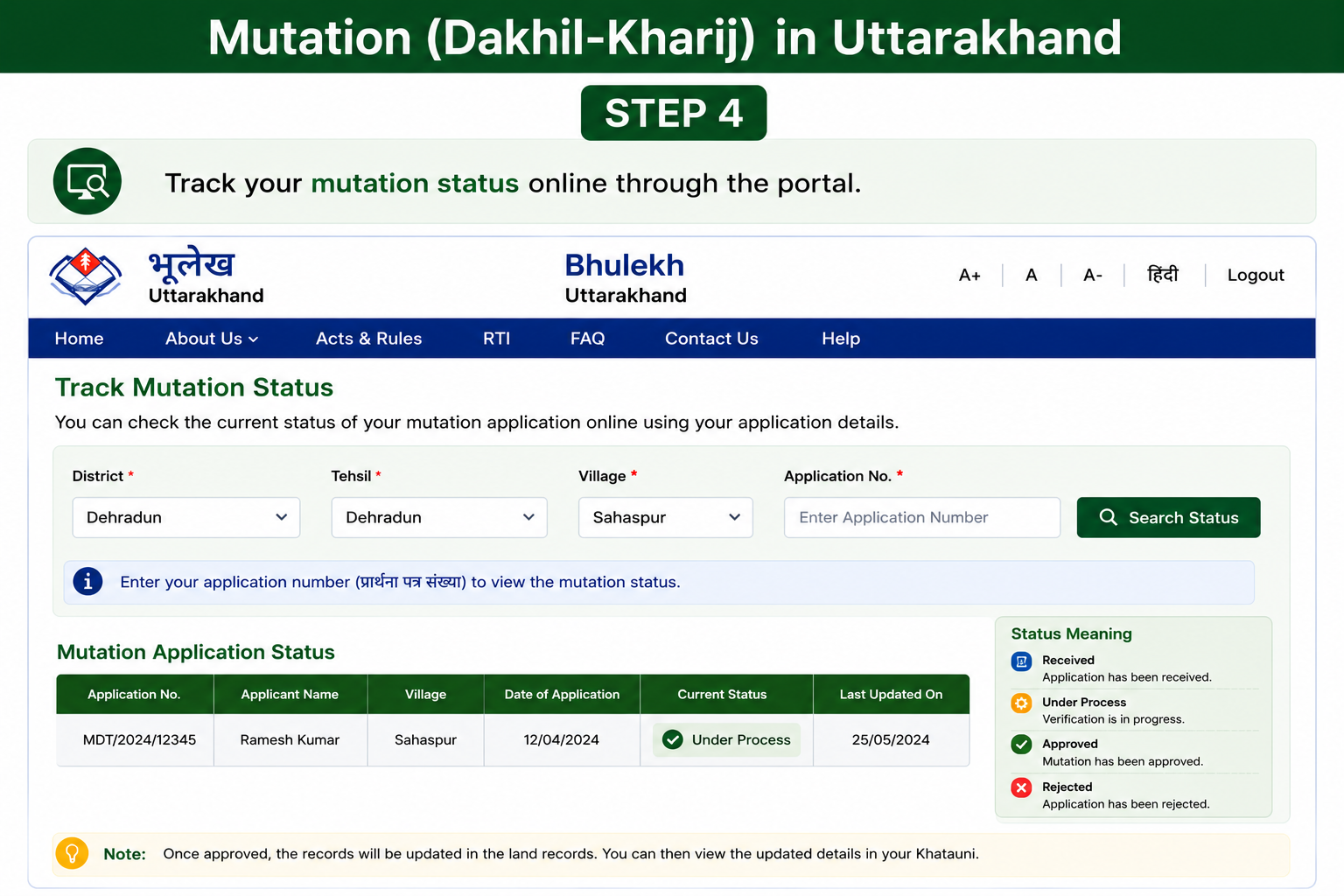
Track Mutation Status Online

Mutation Uttarakhand Step 4

After submitting the application, you can track the mutation status online through the Bhulekh UK portal.

ℹ️

Important Note

Mutation itself does not create ownership rights β€” it only updates government revenue records after ownership has legally changed.

Always confirm that the updated owner name appears correctly in the final Jamabandi / Khatauni records.

LAND USE & RECORD CORRECTION

Changing Land Use Classification

Landowners in Uttarakhand can apply to convert agricultural land into residential, commercial, or other approved categories through the District Land Use Authority.

Once the approval process is completed, the updated classification appears in the official Bhu Abhilekh / Bhulekh record.

πŸ“„

Ownership Proof

Applicants must submit valid ownership documents, such as sale deeds, jamabandi copies, or revenue records.

πŸ—οΈ

Building / Usage Plans

Proposed construction plans or intended land-use details are reviewed before approval.

βš–οΈ

Zoning Approval

The District Land Use Authority checks zoning compliance and approves or rejects the request.

πŸ”„

Record Update

After approval, the revised land-use category is updated in the Bhulekh records.

ℹ️

Important Note

Construction or commercial activity on agricultural land without official conversion approval can lead to legal or revenue-related penalties.

RECORD CORRECTION PROCESS

What If There's an Error in Your Land Record?

Errors in land records can sometimes occur, including:

❌ Wrong khasra number
❌ Spelling mistakes in names
❌ Incorrect land area measurements
❌ Ownership-detail mismatch
STEP 1

Submit a Correction Request

File the correction request through the Devbhoomi portal or directly visit your local Patwari office.

STEP 2

Attach Supporting Documents

Submit supporting proof such as:

  • Registry / sale deed copy
  • Aadhaar card
  • Existing land records
  • Identity and ownership proof
STEP 3

Track Correction Status

Monitor the correction request either online through the portal or by checking directly with the local revenue office.

ONLINE LAND RECORD BENEFITS

Why Use Bhulekh UK Online Instead of Visiting an Office?

The Bhulekh UK portal has made land-record access significantly easier compared to the old process of repeated visits to Tehsil and revenue offices.

From ownership verification to mutation tracking, most basic services can now be accessed online from a mobile phone or laptop.

🚫

No Queues

View land records anytime, from anywhere, without waiting in long government-office lines.

⚑

Faster Transactions

Mutation requests, loan applications, and property registrations move faster when records are digitally verified.

πŸ”

Better Transparency

Online records reduce dependence on middlemen and lower the risk of manual-record disputes or hidden changes.

πŸ•’

24Γ—7 Access

The portal is available round the clock and isn't limited to normal office timings.

🏦

Useful for Bank Loans

Banks often require ownership verification and revenue records before approving agricultural or property loans.

βš–οΈ

Helpful in Legal Disputes

Digitized records help verify ownership history and reduce confusion during land disputes.

🌾

Agricultural Planning

Farmers can use khasra and land records for crop planning, subsidy applications, and revenue verification.

🏑

Easy Ownership Verification

Buyers and families can quickly verify ownership details before property transactions.

ℹ️

In Simple Terms

Bhulekh UK turns what once required multiple government-office visits into a much faster online process β€” improving convenience, transparency, and access to land records across Uttarakhand.

COMMON QUESTIONS

Frequently Asked Questions

Here are some of the most commonly asked questions about Bhulekh UK, Devbhoomi, mutation tracking, and online land records in Uttarakhand.

Is Bhulekh UK the same as Devbhoomi?
?

Yes. Devbhoomi is the official portal name, while Bhulekh UK (or e Bhulekh UK) is the commonly used term for the same Uttarakhand land-records system.

Can I get a legally valid copy of my RoR online?
?

No. The online copy available on the portal is meant only for informational or reference purposes.

For a legally valid, stamped, certified copy, you must visit the Tehsil Land Record Computer Centre.

What details can I use to search my land record?
?

You can search land records using any one of these:

  • Khasra / Gata number
  • Khata (account) number
  • Landowner's name
How do I check mutation status online?
?

You can track mutation status using:

  • The application status tracker
  • The "Live Tehsil Status" feature

Both options are available through the portal.

Does Bhulekh UK cover all districts of Uttarakhand?
?

Yes. The portal covers all 13 districts of Uttarakhand under the state's digital land-records system.

ℹ️

Important Note

Government portal URLs, fees, and land-record procedures may change periodically based on updates issued by the Uttarakhand Revenue Department.

Always cross-check the latest details on the official bhulekh.uk.gov.in or devbhoomi.uk.gov.in portal before relying on them for legal, financial, or property-related decisions.

01
Jacob Hill
About the Author

Jacob Hill

Writer at BhulekhUK.org

Jacob Hill writes for BhulekhUK.org, a site that helps people make sense of Uttarakhand's land records. From finding a khasra number to tracking a mutation application, he breaks down official jargon into plain, useful advice. When he's not writing, he's likely exploring the latest portal updates and revenue department procedures.